BY PUNGGAWA CYBERSECURITY MEDIA CENTER
Imagine receiving a WhatsApp message from an unknown number containing what appears to be a digital wedding invitation (surat undangan pernikahan) or an urgent package delivery receipt. To view the details, the message prompts you to download and install a small file: SURAT UNDANGAN.apk or resi pengiriman.apk.
Curiosity or urgency takes over. You tap install. Within seconds, nothing seems to happen on your screen—but behind the scenes, a quiet heist has begun.
This is the psychological bait driving a highly dangerous wave of mobile banking fraud across Indonesia. By disguising malicious Android Package (APK) files as everyday civil notifications, threat actors are bypassing human skepticism to gain a foothold on personal devices. Once installed, this stealthy malware quietly siphons off one-time passwords (OTPs) and financial credentials, turning a victim’s smartphone into an open gateway to their bank accounts.
To defend against these silent campaigns, performing a rigorous Android malware analysis is essential. Understanding how these packages exploit system-level permissions allows corporate security teams to build better mitigation frameworks and protect vulnerable enterprise users from devastating financial and data losses.
The Threat Landscape: The Rise of SMS-Spy Trojans
In the mobile security ecosystem, malicious APKs are rapidly evolving. The specific campaign analyzed here relies on social engineering, pushing malware payloads through chat platforms or unofficial web forums.
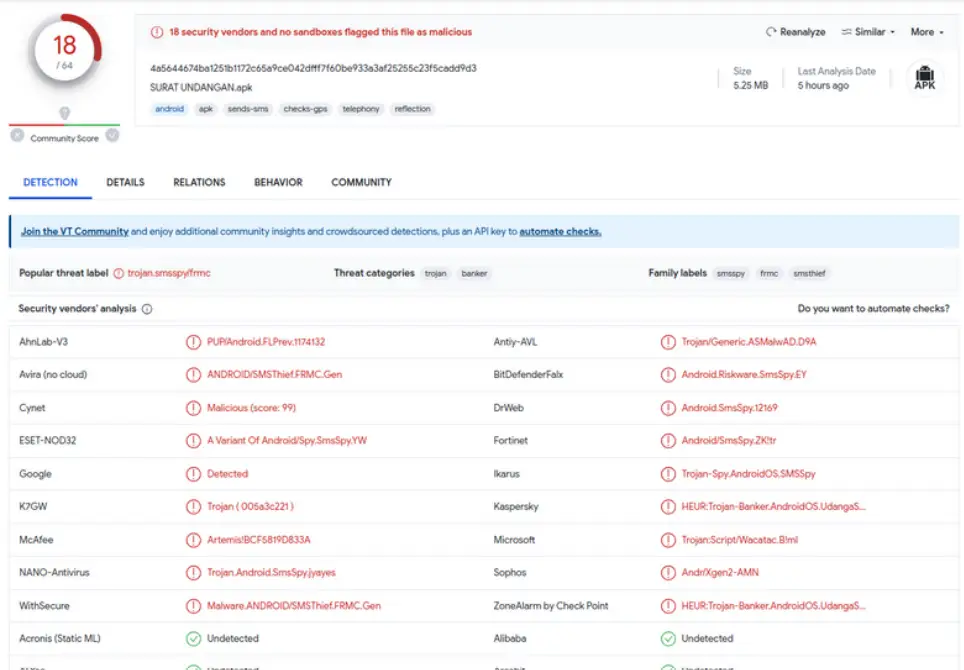
When uploaded to threat intelligence repositories like VirusTotal, these files trigger alarms across major global security engines:
- Popular Threat Label:trojan.smsspy/frmc
- Threat Classification: Trojan Banker / SMS Spy
- Vendor Consensus: Leading security providers—including Kaspersky, McAfee, BitDefender, Avira, and Microsoft—uniformly flag these applications as high-risk Trojan variants engineered specifically to intercept SMS traffic and compromise banking systems.
The danger of this class of malware lies in its targeted simplicity. It does not attempt to break complex encryption algorithms; instead, it simply steals the keys—the SMS-based OTPs—as they arrive on the device.
Static Analysis: Unmasking the Obfuscated Manifest
To understand the inner workings of these malicious applications, security researchers conduct a static Android malware analysis. This process examines the APK’s structural components, metadata, and compiled code without executing the file in a live environment, eliminating the risk of accidental infection.
During a typical static Android malware analysis, the first step is to decompile the APK using tools like jadx-gui. However, modern threat actors actively try to hinder analysis by encrypting or malforming the application’s central configuration file: the AndroidManifest.xml.
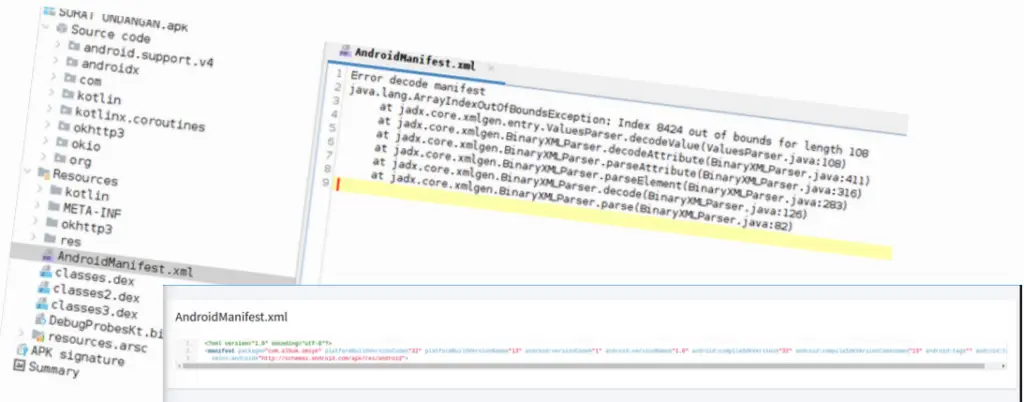
Because the Android operating system must read this manifest to execute the application, researchers can bypass the developer’s encryption trick by utilizing the Android Asset Packaging Tool (aapt). Extracting the manifest via aapt reveals a highly suspicious list of requested system permissions (uses-permission):
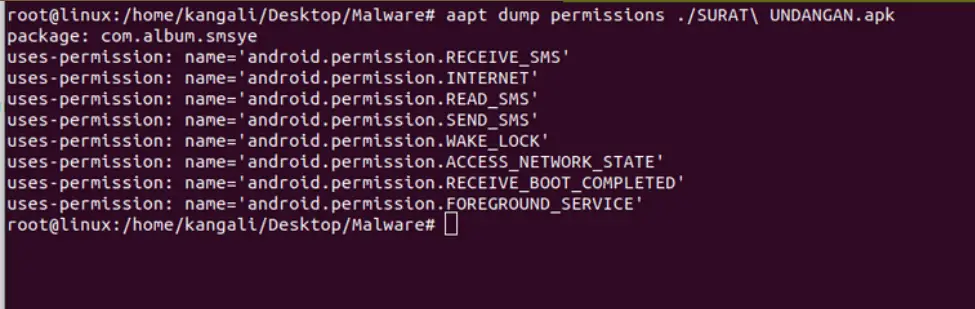
The Permissions Red Flag
While a genuine mobile game or utility app has no functional need to read your text messages, a Trojan banker’s entire operational model depends on it.
The combination of RECEIVE_SMS, READ_SMS, and SEND_SMS grants the application absolute control over the device’s messaging system.
Combined with RECEIVE_BOOT_COMPLETED (which allows the malware to launch automatically as soon as the phone boots up) and FOREGROUND_SERVICE (allowing it to run persistently in the background), the application establishes a silent, permanent tap on the victim’s incoming communications.
The Exfiltration Pipeline: Telegram as a Command & Control (C2) Center
Decompiling the Java source code of the application’s entry point—typically located under com.example.myapplication.MainActivity—uncovers the exact mechanism used to steal data.

Upon its first launch (onCreate), the application immediately prompts the user to grant SMS access permissions. The moment the unsuspecting user taps “Allow,” the malware registers a broadcast receiver tied to SMS events.
The Attack Flow:
[Inbound Bank OTP SMS] ──> [Malicious Broadcast Receiver] ──> [Telegram Bot API Gateway] ──> [Attacker’s Channel]
Rather than building a complex, custom command-and-control server that could easily be flagged by network firewalls, the developers of this Trojan abuse legitimate, high-traffic APIs to exfiltrate stolen data. Specifically, the code is configured to package every incoming SMS—including the sender’s number, timestamp, and message body—and forward it directly to a private Telegram bot channel.
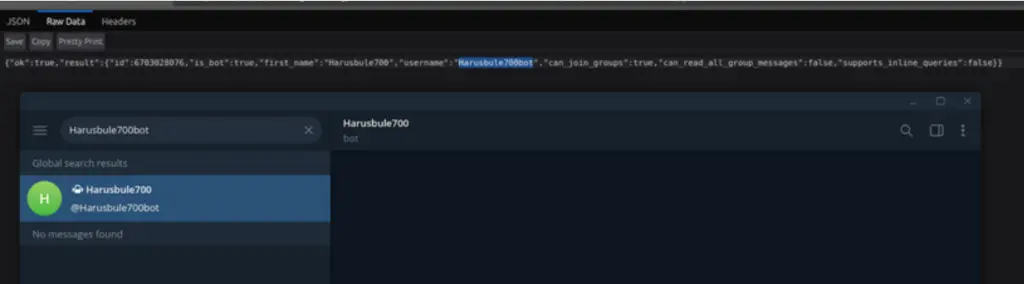
In this analyzed campaign, the malware initiates an HTTP POST request targeting a Telegram bot API endpoint tied to a bot named “HarusBule700”. Whenever a victim receives a banking OTP, the bot immediately broadcasts the message contents directly to the attacker’s private chat room. The attacker can then log into the victim’s banking portal, input the stolen OTP, and authorize fraudulent transactions in real-time.
To keep the victim cooperative, the application may even trigger deceptive local broadcast alerts, displaying misleading system messages like “You have received a mobile credit bonus!” to distract the user while their account is drained.
Secure Your Business: Human Firewall vs. Technical Shields
Technology can be updated overnight, but human habits cannot. As this SMS-spy malware case proves, even the most sophisticated endpoint security system can be dismantled by a single, accidental click from an untrained employee. For businesses in Indonesia, a breach on an employee’s mobile device can expose sensitive corporate credentials and internal networks.
🛡️ Protect Your Enterprise with Punggawa Cybersecurity
To counter these evolving social engineering tactics, Punggawa Cybersecurity provides an end-to-end cyber defense ecosystem tailored for modern enterprises.
- Security Awareness Training: We transform your workforce into a human firewall, training your team to instinctively spot phishing, malicious APK links, and social engineering baits before they click.
- SOC 24/7 Service (Security Operations Center): While your team focuses on business growth, our dedicated SOC team monitors, detects, and neutralizes corporate cyber threats around the clock, ensuring comprehensive peace of mind.
Don’t wait for a silent breach to compromise your corporate assets. Consult with Punggawa Cybersecurity’s security experts today.
Mitigation & Incident Response: Recovering from an Infection
If a device has been compromised by an SMS-spy Trojan, immediate, coordinated action is required to limit the damage:
- Isolate and Uninstall: Boot the Android device intoSafe Mode (which prevents third-party apps from running automatically). Go to Settings > Apps, locate the unrecognized or suspicious application (such as the fake invitation or receipt app), and uninstall it immediately.
- Audit Financial Activities: Immediately log into your online banking accounts using a clean, uncompromised device. Check for any unauthorized transactions or pending transfers.
- Trigger Financial Lockdowns: Contact your bank or financial services provider immediately to report the breach. Request a temporary block on your accounts, cards, and digital wallets.
- Credential Rotation: Change all master passwords, PINs, and security questions for your financial and corporate accounts. Ensure you use strong, distinct credentials for every service.
- Enforce Platform Security: Enable Google Play Protect, keep your Android operating system updated to the latest security patch level, and restrict your device from installing applications from “Unknown Sources.”
Ultimately, the most effective defense against mobile Trojans is proactive awareness. Users must remain deeply skeptical of unsolicited APK files received via messaging apps. In the digital age, a simple wedding invitation or delivery receipt can be the mask worn by a silent thief.
FAQ Section (Frequently Asked Questions)
What is Android malware analysis?
Android malware analysis is the technical practice of inspecting Android applications to map vulnerabilities and dissect malicious behavior. It uses static analysis to examine compiled code and metadata, or dynamic analysis to monitor the application’s activity safely in a sandbox environment.
How do SMS-Spy Trojans compromise mobile banking security?
SMS-Spy Trojans bypass multi-factor authentication by tricking users into approving permissions like RECEIVE_SMS and READ_SMS. Once active, the application intercepts banking OTPs and routes them to attackers, allowing them to execute fraudulent financial transfers.
What are Punggawa Cybersecurity’s flagship services to secure businesses from malware attacks?
Punggawa Cybersecurity provides comprehensive cybersecurity solutions for enterprises in Indonesia. Our core services include a 24/7 SOC (Security Operations Center) for non-stop threat monitoring, Penetration Testing (Pentest) to evaluate and identify system vulnerabilities, and Security Awareness Training to educate employees on how to avoid dangerous APK traps and phishing scams.
Why do companies in Indonesia need a 24/7 SOC Service from Punggawa Cybersecurity?
Malware attacks and cyber heists do not keep office hours. With Punggawa Cybersecurity’s 24/7 SOC Service, your company’s IT infrastructure and digital assets are monitored in real-time by a team of professional cyber experts. We detect and isolate threats instantly—even when your internal team is offline—effectively preventing data breaches that could severely damage your business reputation.
Visit infosec.punggawa.com to read our Punggawa Magazines for more articles like these.