BY PUNGGAWA CYBERSECURITY MEDIA CENTER
Endpoint Detection and Response (EDR) and modern Antivirus (AV) solutions form the cornerstone of enterprise cyber defense. Powered by real-time behavioral monitoring and machine learning analytics, these platforms provide Security Operations Centers (SOCs) with vital visibility across thousands of endpoints.
However, as endpoint defenses have grown more sophisticated, so have adversary techniques. Rather than attempting the risky task of terminating EDR processes—which triggers immediate alerts—threat actors are adopting a far more subtle approach: EDR evasion and silent network blinding. By abusing native operating system architectures like the Windows Filtering Platform (WFP), attackers can mute outbound security telemetry without stopping the underlying security service.
1. The Evasion Shift: From Process Termination to Silent Blinding
Historically, malware attempted to achieve persistence by killing or disabling security services. Modern EDR drivers, however, reside deep within system memory, protected by Early Launch Anti-Malware (ELAM) drivers and Protected Process Light (PPL) mechanisms. Forcing an EDR service to terminate frequently triggers automated high-severity alarms in the SOC.
To bypass these protections, adversaries have shifted toward silent blinding. Under this model:
- The EDR agent remains active on the local host, reporting normal status to local system tools.
- The outbound network path to the centralized management console or cloud engine is quietly severed.
By leaving the process running while blocking outbound traffic, the attacker creates a fatal blind spot: the endpoint appears healthy in management inventories, yet no security alerts reach analysts, therefore resulting in EDR evasion.
2. Technical Breakdown: Abusing the Windows Filtering Platform (WFP)
The Windows Filtering Platform (WFP) is a native set of APIs and system services in Windows that allows network filtering applications to inspect, process, or block packets at various network stack layers. Legitimate security tools and firewalls rely on WFP to enforce policies.
In a targeted EDR evasion campaign, adversaries manipulate this exact framework against installed security agents:
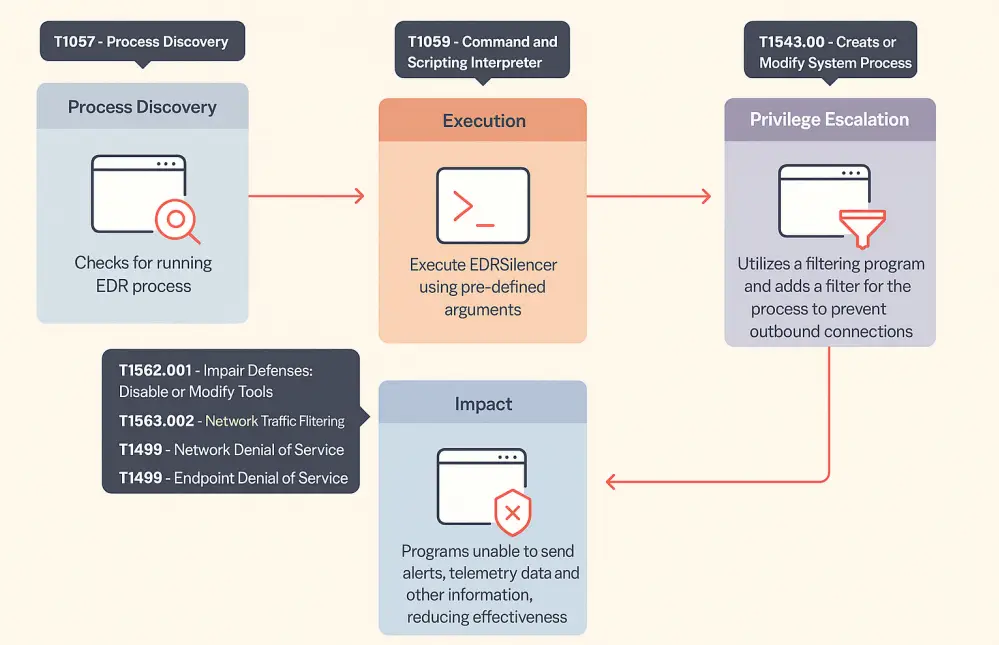
- Process Enumeration: The attack tool scans active processes using native Windows APIs like Process32First() and Process32Next() to resolve target EDR executable paths or Process IDs (PIDs).
- WFP Session Initialization: Once identified, the utility initializes an administrative session with the WFP engine using native API calls.
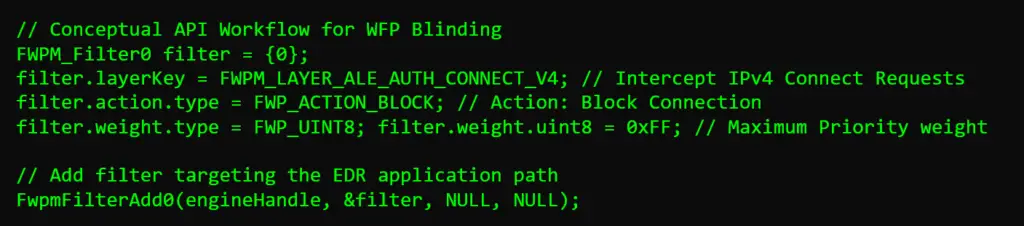
- Injecting Outbound Network Filters: The payload constructs a targeted network filter using the FwpmFilterAdd0 API function. This rule instructs the kernel to immediately drop any outbound TCP or UDP connections originating from the EDR executable path.
Because WFP filters operate at the kernel level, the block takes effect instantaneously. The EDR agent’s network sockets fail quietly, preventing alert payloads, heartbeat metrics, or telemetry logs from leaving the host.
3. Operational Impact on Security Operations Centers (SOCs)
The primary hazard of WFP-based EDR evasion lies in the deceptive operational state it produces:
- Zero Dashboard Alerts: When an adversary executes malicious commands, dumps credentials, or moves laterally, the local EDR agent detects the activity and constructs an alert packet. However, because the outbound network socket is blocked by WFP, the alert never reaches the cloud console or SIEM.
- False Sense of Health: Heartbeat timeouts in cloud-managed EDR solutions are often buffered to account for transient network issues. An attacker can operate freely within this window without triggering an immediate “agent offline” critical incident.
- Preserved Local Artifacts: To a local administrator using Task Manager or PowerShell, EDR processes appear fully operational and green, masking the underlying network quarantine.
While WFP manipulation allows attackers to achieve EDR evasion, the technique relies on native OS interactions that leave definitive forensic footprints.
Key Forensic Event IDs
Security teams should audit Windows Security Event Logs related to connection filtering:
- Event ID 5152: The Windows Filtering Platform has blocked a packet. High volumes of blocked outbound packets originating from legitimate EDR executable paths indicate active network blinding.
- Event ID 5157: The Windows Filtering Platform has blocked a connection. Triggers when an application’s outbound connection request is denied by a custom WFP filter.
- Event ID 5158: The Windows Filtering Platform has allowed a connection. Useful for establishing baseline connection profiles for security agents.
Recommended Defense Controls
- Monitor WFP Configuration Changes: Implement rules within SIEM platforms to trigger immediate alerts whenever new WFP filters are created outside of scheduled updates.
- Audit Administrative API Calls: Monitor for suspicious processes invoking FwpmFilterAdd0 or FwpmBfeStateGet0.
- Out-of-Band Endpoint Telemetry: Implement secondary health checks that cross-reference endpoint network status from network switches, VPN gateways, or cloud management utilities to detect silent endpoints.
Neutralizing Advanced Evasion with Punggawa Cybersecurity
Uncovering complex, kernel-level evasion techniques (EDR evasion) like WFP abuse requires visibility that goes beyond standard automated tools. Punggawa Cybersecurity bridges this exact gap by delivering proactive, intelligence-led defense architectures tailored for modern enterprises:
- 24/7 Managed SOC & Threat Hunting: Continuous monitoring that correlates cross-layer network anomalies and out-of-band telemetry to identify “silent” endpoints before adversaries capitalize on them.
- Penetration Testing & Red Teaming: Stress-testing endpoint defenses against modern evasion methodologies—including EDR evasion methods such as, WFP manipulation and process blinding—to validate actual SOC detection capabilities.
- Security Architecture & Assessment: Evaluating complex enterprise environments to identify systemic blind spots and harden endpoint configurations against native OS abuse.
By combining deep technical expertise with advanced threat intelligence, Punggawa ensures your enterprise defenses remain fully visible and resilient against modern cyber threats.
Frequently Asked Questions (FAQ)
Q1: What is EDR evasion using the Windows Filtering Platform (WFP)?
A: It is a technique where threat actors manipulate native Windows network filtering APIs (such as FwpmFilterAdd0) to block outbound network connections for installed security tools. This prevents EDR agents from sending telemetry and alerts to the SOC console while allowing the security process to appear normal locally.
Q2: Why do attackers prefer blinding EDR outbound traffic over killing the EDR process?
A: Terminating an EDR process often fails due to driver-level protections or triggers high-severity “agent stopped” alerts. Silently blocking outbound traffic via WFP leaves the EDR process active locally, avoiding process-termination alarms while blinding defenders to ongoing malicious actions.
Q3: What APIs are commonly exploited during WFP-based EDR evasion?
A: Attackers typically use process enumeration APIs like Process32First() and Process32Next() to identify EDR executables, followed by WFP functions like FwpmEngineOpen0 and FwpmFilterAdd0 to construct and apply outbound network blocking rules.
Q4: How can security teams detect Windows Filtering Platform abuse?
A: Defenders can detect WFP abuse by auditing Windows Event ID 5157 (Connection Blocked) and Event ID 5152 (Packet Blocked) for security agent executables, and monitoring for unauthorized additions to WFP filter configurations.
Q5: How does Punggawa Cybersecurity protect enterprises against silent endpoint blinding?
A: Punggawa Cybersecurity provides Threat Hunting and 24/7 Managed SOC services that combine out-of-band telemetry analysis with deep event auditing (such as Event IDs 5152 and 5157). Punggawa also conducts comprehensive Penetration Testing to simulate advanced evasion tactics and ensure enterprise defenses detect silent blinding attempts immediately.
 Request a free demo exclusively at: punggawa.com
Note: Visit infosec.punggawa.com to read our Punggawa Magazines for more insights like these.